
Screenshots


App details
- Version
- 0.6.0
- Size
- 5.62 MB
- Updated
- March 10, 2017
- Requires
- Windows 2000
- Language
- English
- License
- Free
- Developer
- Besmir Beqiri
- Category
- Windows OS
SoftPas in:
This product is also available in the following languages:
About Xtreme Media Player
Download Xtreme Media Player – Free Windows Audio Player, GPL, Low‑Space Media Tool
Overview
Xtreme Media Player is a lightweight, free‑of‑charge audio player built for Windows enthusiasts who value speed, simplicity, and a touch of humor. Developed by Besmir Beqiri and released under the GNU GPL license, this tool belongs to the Home & Hobby software category, specifically under Jokes & Distractions – Audio. Although its last official update was on June 19 2012 (version 0.6.0), the player remains functional on legacy Windows platforms, including Windows 95 and later editions. With more than 13,000 downloads since its catalog entry in 2012, Xtreme Media Player has carved out a modest but enthusiastic user base across Poland, the United Kingdom, and Pakistan.
The program’s core promise is “slick performance with a tiny footprint.” Unlike many modern media players that consume hundreds of megabytes, Xtreme Media Player installs in under 5 MB, making it ideal for older machines or users who prefer a clutter‑free environment. The interface is intentionally playful—small jokes appear in the status bar, and the skin adopts a retro‑style look reminiscent of early‑2000s software. Despite its whimsical design, the player delivers all the essential playback functions: play, pause, stop, volume control, playlist management, and support for common audio formats such as MP3, WAV, and OGG.
Because it is distributed in English only, non‑English speakers may need to rely on the intuitive icons rather than textual menus. Nevertheless, the learning curve is shallow, and the player can be up and running within seconds of download. In the following sections we will explore the feature set, walk through the installation process, discuss system compatibility, and weigh the pros and cons that have shaped user opinion over the past decade.
Key Features
- Ultra‑light installer (≈ 4 MB) – perfect for legacy PCs.
- Supports MP3, WAV, OGG, and basic playlist formats (M3U).
- Simple one‑click play/pause UI with minimal learning curve.
- Retro‑styled interface with occasional joke messages for entertainment.
- Volume normalization to prevent sudden loud spikes.
- Drag‑and‑drop playlist creation for quick song queuing.
- Command‑line launch options for power users.
- Portable mode – run directly from a USB stick without installation.
- Automatic detection of audio files in a selected folder.
- GPL‑licensed source code available for community tweaks.
While the feature list may appear modest compared with heavyweight media suites, each element is designed for reliability and low resource consumption. The volume normalization feature, for instance, ensures that tracks recorded at different levels play back at a consistent loudness, reducing the need for manual adjustments. The portable mode is particularly useful for users who travel with a Windows laptop and want to avoid cluttering the system registry. Because the software is open source, hobby developers can add custom skins or extend format support, keeping the player relevant even after a decade of inactivity.
Another notable aspect is the built‑in playlist handling. Users can create, save, and load M3U playlists without external editors. The drag‑and‑drop functionality lets you reorder tracks instantly, which is handy during a party or when curating a personal mixtape. Overall, Xtreme Media Player offers a balanced mix of essential playback capabilities and playful touches that set it apart from bland, corporate‑styled players.
Installation & Usage Instructions
Step‑by‑Step Installation
- Visit the official download page and click the “Download Xtreme Media Player” button. The file is a single
.exeinstaller (approximately 4 MB). - Once the download completes, double‑click the installer. Windows will display a security warning; confirm that you wish to run the program.
- The setup wizard guides you through a classic “Next‑Next‑Finish” flow. You can choose the default installation folder (usually
C:\Program Files\Xtreme Media Player) or specify a custom path. - During installation you may select “Create desktop shortcut” and “Add to Start menu” for quick access. The portable mode option can be left unchecked if you prefer a traditional install.
- After the installer finishes, click “Finish” to launch the application automatically.
First‑Time Use
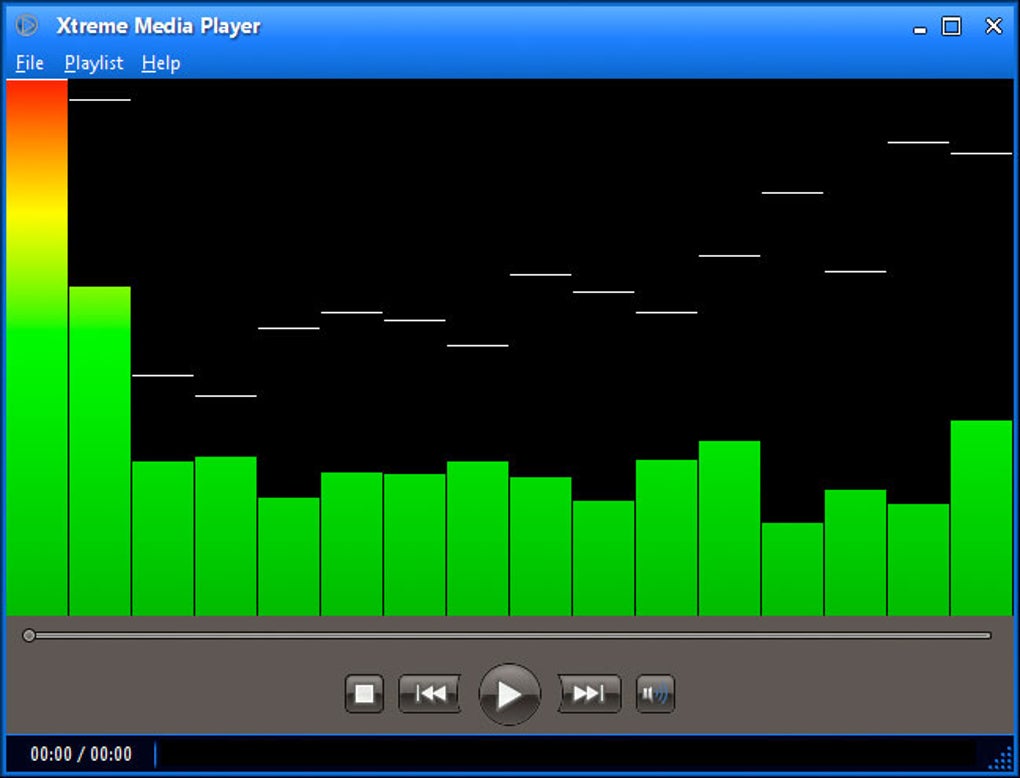
When Xtreme Media Player opens for the first time, you will see a clean window with large play/pause buttons, a volume slider, and a small status bar that occasionally displays jokes (“Why did the audio file cross the road? To get to the other side‑track!”). To start listening, drag an audio file from Windows Explorer onto the player’s main window, or use the File → Open menu to browse for files.
For playlist creation, select Playlist → New, then drag additional tracks into the list area. You can save the playlist via Playlist → Save As. The player remembers the last opened folder, making it faster to add more files later. Volume normalization is enabled by default; you can toggle it off in Settings → Audio if you prefer raw output.
Advanced users can launch the player from the command line with parameters such as /play to start playback immediately, or /portable to run the application without touching the registry. These options are documented in the ReadMe.txt file bundled with the installer.
Compatibility & System Requirements
Xtreme Media Player is built for Windows 95 and all subsequent versions, including Windows 98, ME, 2000, XP, Vista, 7, 8, and 10. Although the software was last updated in 2012, its reliance on legacy Win32 APIs ensures it runs smoothly on modern 64‑bit Windows installations, provided the “Compatibility Mode” is enabled for older operating systems if needed.
Minimum system specifications are deliberately low:
- CPU: 500 MHz processor (Pentium III or newer)
- RAM: 64 MB (128 MB recommended for smoother operation)
- Hard Disk: 5 MB free space for installation, plus additional space for music files
- Graphics: Any DirectX‑compatible video adapter (no GPU acceleration required)
- Audio: Standard Windows sound driver (WASAPI or DirectSound)
Because the player does not depend on heavy external libraries, it also runs well on virtual machines and lightweight laptops. Users on Windows 10 may notice a visual style difference due to the older UI design, but the functionality remains unchanged. If you experience display scaling issues on high‑DPI monitors, right‑click the executable, select “Properties → Compatibility → Change high DPI settings,” and enable “Override high DPI scaling behavior.”
For users who need a truly portable solution, copying the entire installation folder to a USB stick and launching xtremeplayer.exe will work without any registry modifications. This makes Xtreme Media Player a handy companion for public computers, travel laptops, or shared workstations where administrative rights are limited.
Pros, Cons, and Frequently Asked Questions
Pros
- Extremely small download and installation size.
- Runs on very old Windows versions, ideal for legacy hardware.
- Open‑source GPL license encourages community contributions.
- Simple, intuitive UI with a playful touch.
- Portable mode enables use without installation.
- Supports the most common audio formats out of the box.
Cons
- No support for modern video formats or streaming services.
- Interface looks dated on Windows 10/11.
- Last official update was in 2012; no official bug‑fix pipeline.
- Lacks advanced audio processing features (e.g., equalizer, DSP plugins).
- English‑only UI may limit non‑English speakers.
FAQ
Is Xtreme Media Player completely free?
Yes, the player is released under the GNU GPL license, meaning you can download, use, and even modify the software at no cost.
Can I play video files with Xtreme Media Player?
No. Xtreme Media Player focuses solely on audio playback. For video you’ll need a dedicated video player such as VLC or MPC‑H.
How do I run the player in portable mode?
Copy the entire installation folder to a USB stick, then launch xtremeplayer.exe. The application will store settings in the same folder instead of the Windows registry.
Is the software compatible with Windows 11?
Yes, it runs on Windows 11 when executed in compatibility mode for Windows 7 or earlier. Some visual elements may appear scaled incorrectly, which can be fixed via DPI settings.
Where can I find the source code?
The source code is hosted on the developer’s GitHub repository (link provided on the official download page). Being GPL‑licensed, you are free to fork and customize it.
Conclusion & Call to Action
In a world saturated with feature‑heavy media suites, Xtreme Media Player stands out by embracing minimalism, low‑resource consumption, and a dash of humor. Its free GPL status, tiny footprint, and compatibility with legacy Windows versions make it a compelling choice for users with older hardware, those who need a portable audio solution, or hobbyists looking for an open‑source project to tinker with. While it lacks modern conveniences like streaming integration or advanced equalization, the core playback experience remains reliable and straightforward.
If you are searching for a secure, free, and easy‑to‑install audio player that won’t hog disk space or RAM, give Xtreme Media Player a try. Click the download button below, install the 4 MB package, and enjoy instant music playback without the bloat.
Guides & Tutorials
How to install Xtreme Media Player
- Click the Download button above.
- Once redirected, accept the terms and click Install.
- Wait for the Xtreme Media Player download to finish on your device.
How to use Xtreme Media Player
This software is primarily used for its core features described above. Open the app after installation to explore its capabilities.
User Reviews
No reviews yet. Be the first to share your experience.
You may also like
more
Llama 2
Free-to-use large language model As the new addition to Meta’s arsenal of langua...

NotebookLM
Revolutionizing the note-taking and idea-generation process NotebookLM is an exp...

Github co pilot
AI-inspired software development and coding platform GitHub Copilot is a browser...

Google Gemma
Google’s lightweight AI models Introducing Google Gemma , a family of cutting-ed...

AI Image Enlarger
A free app for Windows, by ai-image-larger. AI Image Enlarger is a free software...

DALL E
AI-driven text-to-image transformation engine DALL·E is a free graphic and desig...